Integration in Visual Studio Code
How to integrate the ADOxx MCP server in Visual Studio Code
Visual Studio Code (https://code.visualstudio.com/) is a popular code editor developed by Microsoft. It has built-in abilities to connect to external MCP servers.
This article describes how to configure Visual Studio Code to connect to the ADOxx MCP server.
Configuration
To set up a connection to an ADOxx MCP, in the Command Palette, open "MCP: Open User Configuration". This will open the mcp.json file that contains the configuration of MCP servers to connect to.
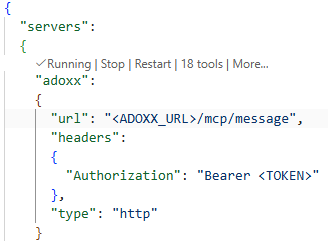
A sample configuration using the ADOxx MCP server will look like this:
{
  "servers":
  {
    "adoxx":
    {
      "url": "<ADOXX_URL>/mcp/message",
      "headers":
      {
        "Authorization": "Bearer <TOKEN>"
      },
      "type": "http"
    }
  }
}
<ADOXX_URL> is the URL at which the application is available (e.g. https://<HOST>:<PORT>/ADOxx), <TOKEN> is a generated OAuth 2 or OIDC token that can be generated via the oauth2/token or oidc/token endpoints or directly in the Authentication component on the Administration Page (https://docs.boc-group.com/adonis/en/docs/16.6/news/#oauth-20--oidc-generate-tokens--first-party-applications).
With this configuration, Visual Studio Code will be able to connect to the ADOxx MCP server and fetch the list of available tools: